
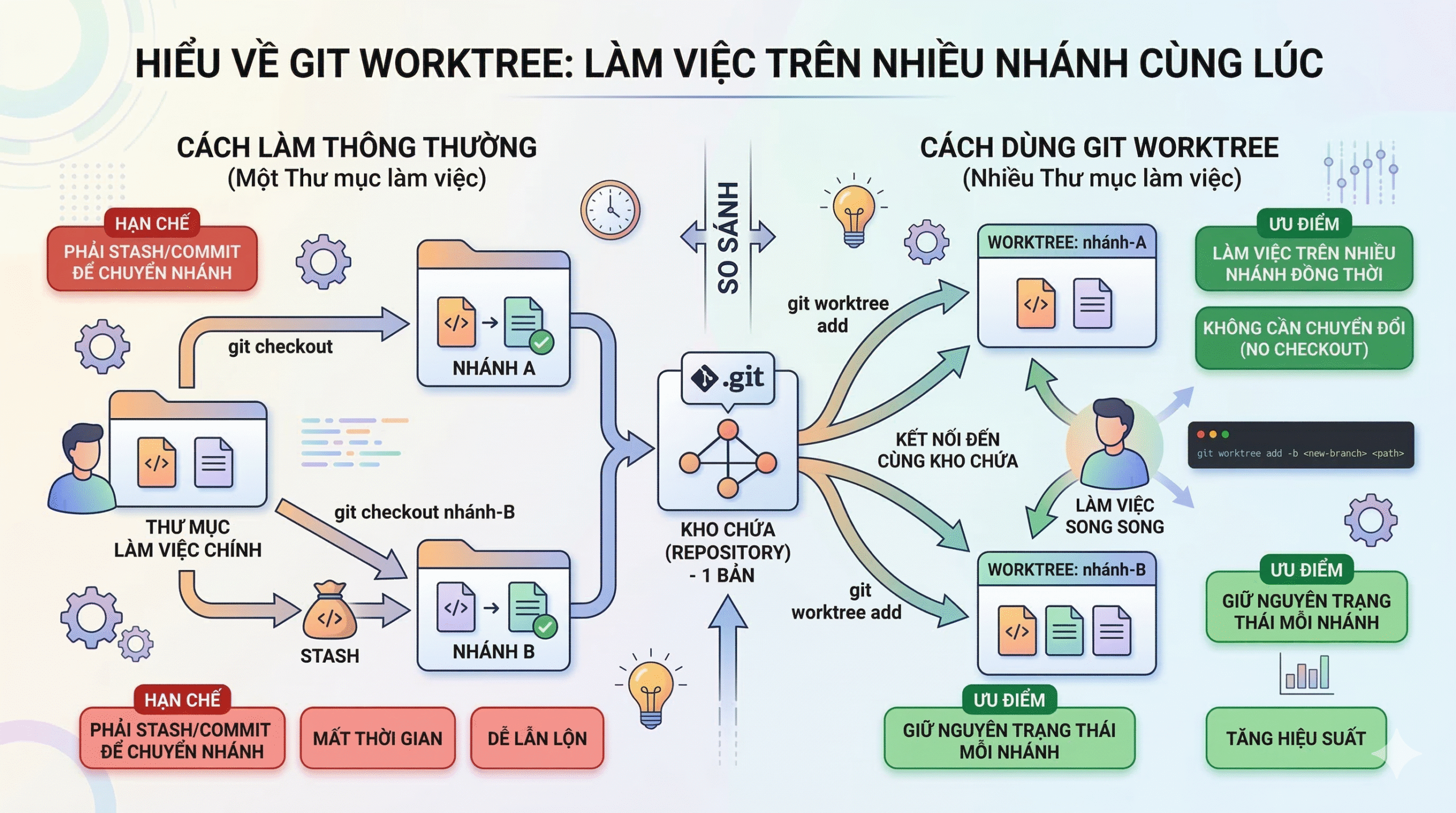
Một Git worktree tutorial thực tế cho thấy cách làm việc trên nhiều branch cùng lúc, tăng tốc code review và tránh phải stash hoặc chuyển ngữ cảnh liên tục.
Nội dung
- Git Worktree Là Gì?
- Tại sao không dùng các terminals khác nhau?
- Git Worktree Prerequisites
- Creating Your First Worktree
- Git Worktree Use Cases
- Managing and Cleaning Up Worktrees
- Best Practices and Common Pitfalls
- Advanced Worktrees: AI-Assisted Parallel Development
- Kết
Bạn đang làm việc trên một feature branch thì một đồng đội nhờ bạn review pull request của họ. Bạn có thể stash các thay đổi, chuyển branch, rồi hy vọng nhớ được mình đã dừng ở đâu. Hoặc bạn có thể commit một phần công việc còn dang dở chỉ để tránh bị mất nó.
Rồi đến tình huống hotfix khẩn cấp: production bị down, trong khi bạn đang refactor sâu vào phần code liên quan đến một nửa codebase.
Mỗi lần chuyển ngữ cảnh (context switch) như vậy thường tốn 10–15 phút thiết lập lại môi trường và phá vỡ sự tập trung của bạn.
Git worktree giải quyết vấn đề này bằng cách cho phép bạn checkout nhiều branch cùng lúc trong các thư mục khác nhau.
Thay vì stash hoặc commit code chưa hoàn thành, bạn chỉ cần cd sang một thư mục khác nơi một branch khác đã được checkout sẵn. Làm hotfix, deploy, rồi cd quay lại feature branch của bạn đúng trạng thái bạn đã rời đi.
Trong tutorial này, tôi sẽ chỉ cho bạn cách tạo và quản lý worktree, tránh các lỗi phổ biến, và tích hợp chúng vào workflow hằng ngày.
Bạn nên đã hiểu Git branch, commit và các thao tác command-line cơ bản. Nếu cần ôn lại kiến thức Git cơ bản, tôi khuyên bạn xem Introduction to Git tutorial của DataCamp để nắm các khái niệm cốt lõi.
Git Worktree Là Gì?
Git worktree là một tính năng tích hợp sẵn của Git cho phép tạo nhiều working directory liên kết tới cùng một repository.
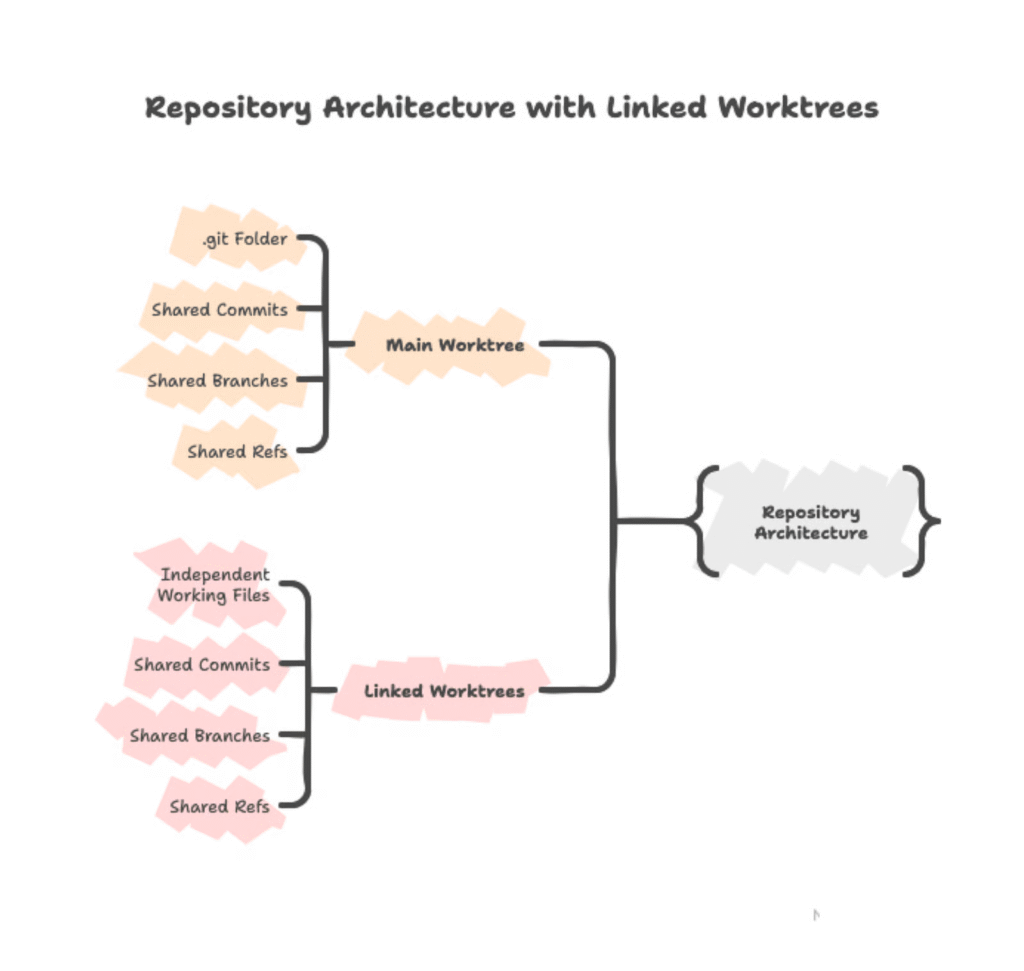
Working directory chính của bạn là primary worktree, và mỗi worktree bổ sung sẽ có:
- một thư mục riêng
- một branch riêng được checkout
- nhưng cùng sử dụng một repository .git
Diagram showing repository architecture – main worktree with .git folder in center, multiple linked worktrees pointing back to it. Arrows showing “shared commits/branches/refs” vs “independent working files” in each worktree directory
Kiến trúc repository dùng chung này có nghĩa là mọi commit bạn tạo trong bất kỳ worktree nào sẽ lập tức xuất hiện trong Git database chung, và có thể truy cập từ tất cả các worktree khác.
Tuy nhiên file trong từng worktree vẫn độc lập — ví dụ bạn chỉnh sửa train.py trong một worktree chỉ ảnh hưởng thư mục đó cho đến khi bạn commit.
Tại sao không dùng các terminals khác nhau?
Bạn không thể mở nhiều terminal trong cùng một thư mục và làm việc trên nhiều branch cùng lúc.
Git chỉ cho phép một branch được checkout tại một thư mục.
Ví dụ:
git checkout feature-b
Nếu bạn chạy lệnh này trong một terminal, tất cả terminal khác đang trỏ vào cùng thư mục đó cũng sẽ bị thay đổi file theo branch mới.
Git worktree giải quyết vấn đề này bằng cách cấp cho mỗi branch một thư mục riêng.
Mỗi thư mục hoàn toàn độc lập với:
- file
- process đang chạy
- build artifacts
Chuyển branch giờ chỉ đơn giản là:
cd ../different-directory
thay vì
git checkout different-branch
Git Worktree Prerequisites
Trước khi dùng git worktree, hãy kiểm tra môi trường:
Git 2.5 hoặc mới hơn
git --version
Git worktree được phát hành năm 2015, nên hầu hết hệ thống đều đã có.
Existing Git repository
Bạn cần một repository có ít nhất một branch.
Command-line familiarity
Mọi thao tác worktree đều thực hiện trong terminal.
Kiểm tra worktree:
git worktree --help
Nếu hiển thị trang help thì bạn đã sẵn sàng.
When to use git worktree
Git worktree phù hợp khi việc chuyển branch sẽ làm gián đoạn công việc hiện tại:
Code reviews
Test thay đổi của team member mà không cần stash code đang làm.
Emergency hotfixes
Fix bug production trong khi vẫn giữ nguyên refactoring của bạn.
Parallel development
Làm hai feature độc lập mà không phải chuyển branch liên tục.
Long-running processes
Chạy test suite 30 phút trong một worktree và tiếp tục code ở worktree khác.
Không cần dùng worktree khi:
- Task nhỏ dưới 10 phút
- Chỉ tập trung một công việc duy nhất
Tạo Worktree Đầu Tiên của bạn
Cách tốt nhất để hiểu git worktree là tạo một worktree và xem nó hoạt động.
Chúng ta sẽ:
- Tạo worktree
- Xem cấu trúc Git tạo ra
- Quan sát cách commit lan giữa các worktree.
Setup repository mẫu
Trước tiên bạn cần một Git repository.
Nếu bạn đã có Python project nhiều branch, bỏ qua phần này.
Nếu chưa, hãy tạo ML pipeline đơn giản.
mkdir ml-pipeline
cd ml-pipeline
git init
Tạo README và script Python:
echo "# ML Pipeline" > README.md
echo "def load_data():" > train.py
echo "    print('Loading training data...')" >> train.py
Kiểm tra file:
ls
# You should see: README.md  train.py
Commit và tạo branch:
git add .
git commit -m "Initial commit"
git branch feature-preprocessing
Bây giờ repository có hai branch:
mainfeature-preprocessing
Tạo worktree cơ bản
Tạo worktree cho branch đã tồn tại:
git worktree add ../ml-pipeline-preprocessing feature-preprocessing
Git sẽ:
- tạo thư mục
ml-pipeline-preprocessing - checkout branch
feature-preprocessing - liên kết với repository hiện tại
Git xác nhận:
Preparing worktree (checking out 'feature-preprocessing')
HEAD is now at 0a7f986 Initial commit
Tạo branch mới + worktree cùng lúc:
git worktree add -b feature-visualization ../ml-pipeline-viz
Flag -b:
- tạo branch mới
- checkout branch đó trong worktree mới.
Exploring the worktree structure
Để xem tất cả worktree:
git worktree list
/Users/you/projects/ml-pipeline                  0a7f986 [main]
/Users/you/projects/ml-pipeline-preprocessing    0a7f986 [feature-preprocessing]
Dòng đầu là main worktree (chứa .git).
Dòng sau là linked worktree.
Mỗi dòng hiển thị:
- commit hash
- branch đang checkout.
IMAGE PLACEHOLDER
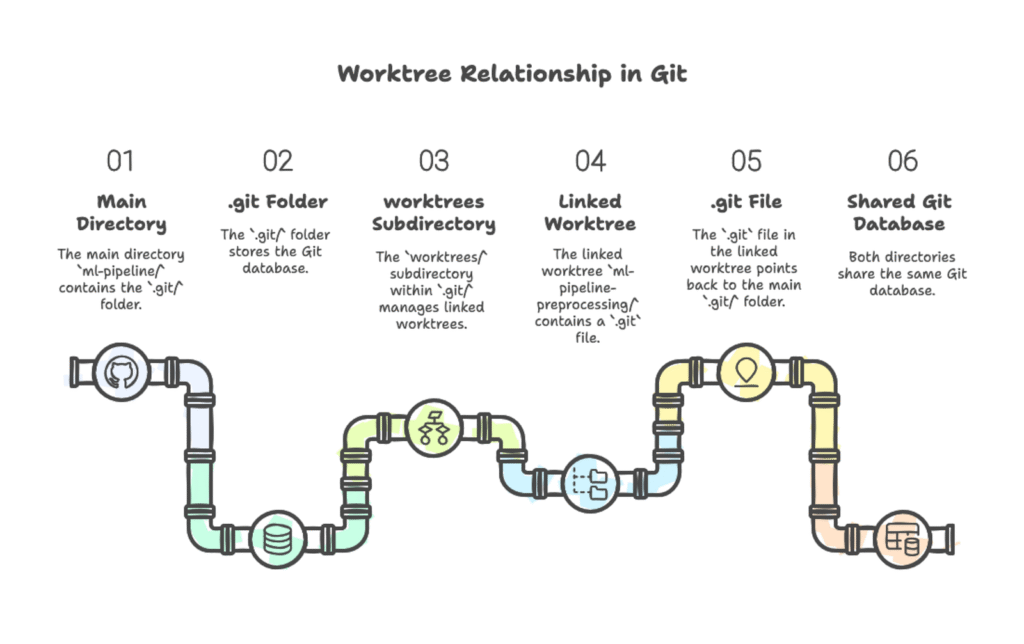
Filesystem diagram showing the relationship between worktrees.
Main directory ml-pipeline/ contains .git/ folder with worktrees/ subdirectory.
Linked worktree ml-pipeline-preprocessing/ contains .git file (not folder) pointing back to main .git/.
Both directories contain files (README.md, train.py) but share the same Git database.
Mỗi worktree hoạt động như một Git repository hoàn chỉnh.
Bạn có thể:
- chỉnh sửa file
- chạy
git status - commit.
Worktree liên kết không chứa .git folder đầy đủ — thay vào đó chỉ có .git file trỏ về repository chính.
Trong .git chính sẽ có thư mục:
.git/worktrees
nơi lưu metadata của các worktree.
Working in a worktree
Di chuyển vào worktree:
cd ../ml-pipeline-preprocessing
Thêm code:
cat >> train.py << 'EOF'def preprocess_features(df):
   """Normalize numeric features."""
   return (df - df.mean()) / df.std()
EOF
Commit:
git add train.py
git commit -m "Add feature preprocessing function"
[feature-preprocessing 7c8d4e2] Add feature preprocessing function
1 file changed, 3 insertions(+)
Quay lại worktree chính:
cd ../ml-pipeline
git log --oneline --all
Commit mới xuất hiện:
7c8d4e2 Add feature preprocessing function
0a7f986 Initial commit
Lưu ý: commit xuất hiện ngay lập tức trong mọi worktree.
Git Worktree Use Cases
Sau khi biết cách tạo worktree, hãy xem các tình huống thực tế.
Code review workflow
Đồng đội cần review PR.
Thay vì stash:
git worktree add ../ml-pipeline-review pr/update-training
cd ../ml-pipeline-review
Chạy project:
pip install -r requirements.txt
python train_model.py --config experiments/baseline.yaml
Sau khi review xong:
cd ../ml-pipeline
git worktree remove ../ml-pipeline-review
Code của bạn không bị ảnh hưởng.
Không stash.
Không context switching.
Emergency hotfixes
Không dùng worktree
- stash code
- checkout main
- fix bug
- push
- checkout feature
- unstash
- nhớ lại đang làm gì
Dùng worktree
git worktree add ../ml-pipeline-hotfix main
cd ../ml-pipeline-hotfix
Fix bug:
git add src/data/validation.py
git commit -m "Fix schema validation for nullable timestamp fields"
git push origin main
Quay lại:
cd ../ml-pipeline
git worktree remove ../ml-pipeline-hotfix
Bạn quay lại refactor trong vài giây.
Parallel feature development
Bạn đang làm hai feature:
- custom metrics
- data loader
Tạo worktree:
git worktree add -b feature-custom-metrics ../ml-pipeline-metrics
git worktree add -b feature-streaming-loader ../ml-pipeline-loader
Filesystem:
~/projects/
 ml-pipeline/           [main]
 ml-pipeline-metrics/   [feature-custom-metrics]
 ml-pipeline-loader/    [feature-streaming-loader]
Chạy song song:
# Terminal 1
cd ~/projects/ml-pipeline-metrics
python experiments/evaluate_custom_metrics.py
# Terminal 2
cd ~/projects/ml-pipeline-loader
pytest tests/test_data_loader.py -v
Hai process chạy đồng thời không xung đột.
Merge xong:
git merge feature-custom-metrics
git worktree remove ../ml-pipeline-metrics
Managing and Cleaning Up Worktrees
Flowchart showing worktree lifecycle:
Create → Work → Commit → Remove / Prune
Listing worktrees
git worktree list
/Users/you/projects/ml-pipeline                  a3f9c81 [main]
/Users/you/projects/ml-pipeline-review           b7d4e92 [pr/data-validation]
/Users/you/projects/ml-pipeline-hotfix           a3f9c81 [hotfix/schema-bug]
Extract paths
git worktree list | awk '{print $1}'Removing worktrees
git worktree remove ../ml-pipeline-review
Nếu có file chưa commit:
fatal: '../ml-pipeline-review' contains modified or untracked files
Force:
git worktree remove --force ../ml-pipeline-review
Nếu worktree bị lock:
git worktree remove --force --force ../ml-pipeline-locked
Nếu bạn xóa thư mục bằng rm -rf:
git worktree prune
Preview:
git worktree prune --dry-run
Best Practices and Common Pitfalls
Worktree organization
Cách phổ biến:
~/projects/
 ml-pipeline/
 ml-pipeline-feature-auth/
 ml-pipeline-hotfix-login/
Hoặc:
~/projects/
 ml-pipeline/
 ml-pipeline-worktrees/
   feature-auth/
   hotfix-login/
Tên nên mô tả rõ branch.
Tránh tên chung chung như:
ml-pipeline-temp
ml-pipeline-2
Common pitfalls
Same branch in multiple worktrees
git worktree add ../ml-pipeline-duplicate main
Git sẽ chặn:
fatal: 'main' is already used by worktree
Forgotten worktrees
Worktree tồn tại cho đến khi bạn xóa nó.
Repo 500MB + 5 worktrees = 2.5GB disk usage.
Nesting worktrees
Không tạo worktree bên trong worktree khác.
Workflow optimization
Alias:
alias gwl='git worktree list'
alias gwa='git worktree add'
alias gwr='git worktree remove'
Function:
wt() {
 git worktree add "../${PWD##*/}-$1" -b "$1"
 cd "../${PWD##*/}-$1"
 python -m venv .venv && source .venv/bin/activate && pip install -r requirements.txt
}
${PWD##*/} lấy tên folder hiện tại.
Chạy:
wt feature-logging
Git sẽ:
- tạo worktree
- cd vào
- setup virtual environment.
Advanced Worktrees: AI-Assisted Parallel Development
Worktrees mở ra workflow AI coding song song.
Tạo nhiều worktree:
git worktree add -b feature-add-logging ../ml-pipeline-logging
git worktree add -b feature-optimize-preprocessing ../ml-pipeline-optim
git worktree add -b bugfix-memory-leak ../ml-pipeline-bugfix
Chạy AI agent:
# Pane 1
cd ~/projects/ml-pipeline-logging
claude
# Pane 2
cd ~/projects/ml-pipeline-optim
claude
# Pane 3
cd ~/projects/ml-pipeline-bugfix
claude
Mỗi AI instance làm một feature riêng.
Một số team báo cáo:
- hoàn thành việc trong vài giờ thay vì vài ngày
- chạy 4–5 Claude Code agents song song
Tradeoffs:
Token consumption
Nhiều AI session → nhiều API credits.
Setup overhead
Mỗi worktree cần environment riêng.
Cognitive load
Quản lý nhiều conversation.
Kết
Quay lại tình huống ban đầu:
đồng đội cần bạn review PR khi bạn đang làm feature.
Giờ bạn biết giải pháp:
git worktree add ../ml-pipeline-review pr/branch-name
cd ../ml-pipeline-review
Review xong quay lại.
Feature branch của bạn không bị ảnh hưởng.
Không stash.
Không commit code dở dang.
Không phải nhớ lại context.
Hai thư mục.
Hai branch.
Zero friction.
Git worktree không làm workflow phức tạp hơn — nó loại bỏ sự phức tạp.
Mỗi worktree chỉ là một thư mục với một branch checkout.
Nhưng chính sự đơn giản này mở ra một khả năng mạnh mẽ:
chuyển ngữ cảnh tức thì giữa các task mà không phải chịu gánh nặng nhận thức của stash, checkout và rebuild mental context.
Khi bạn cần tích hợp worktrees vào workflow team như pull request và code review, GitHub Foundations skill track của DataCamp sẽ hướng dẫn các best practice để làm việc hiệu quả trong team distributed.
Cuối cùng, là Cheatsheet tóm tắt những gì bạn đã biết ở trên. Không quên download về nhé!
Để lại một bình luận
Bạn phải đăng nhập để gửi bình luận.